
 PomoZentra
A free onlinePomodoro timerthat stays withyour work.
Start a focused round without creating an account and keep the timer visible in a floating Picture-in-Picture panel. Sign in free when you want weekly planning, outputs, alignment, reports, exports, and sync.
All features are free. No card required. Start without login.
Timer and tasks work without login. Sign in free for the complete workspace and cross-device sync.
The three extra Admin blocks you ran are logged. They just don't fill the Delivery gap.

Keep your Pomodoro timer visible while you work.
Open the current round in a floating Picture-in-Picture panel. It stays above your work, shows the current task and time, and lets you control focus, completion, breaks, and extra time without returning to the full app.
The floating panel uses your browser's Document Picture-in-Picture support, so it opens on desktop browsers that provide it. Where it is unavailable the button does not appear and the timer keeps running in the app tab.
A timer can count rounds. It cannot tell you whether they went to the right work.
Most timers show minutes and completed sessions. PomoZentra adds the missing comparison: whether those sessions reached the work areas you deliberately chose for the week.
All true, and none of it tells you whether tomorrow should look the same.
The same six hours, described against a decision you already made on Monday.
See the complete focus loop
Plan the week, run the timer, and review where your focused work actually went.
Start the free timer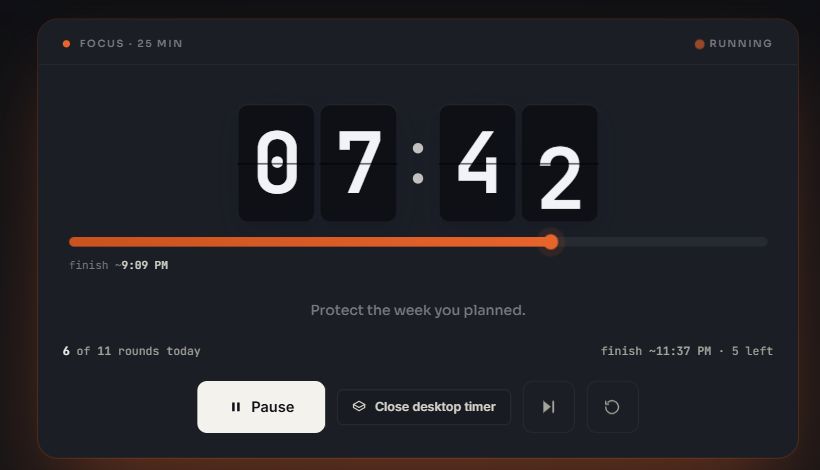
Plan. Focus. Keep it visible. Compare. Correct.
A simple workflow connects weekly priorities with the focused blocks you complete.
Plan the week
Pick one to three focus areas for this week, then lay out how many blocks each work area should get on each day. Duplicate last week or start from a template.
Run the block
Start a task in its work area and run the focus countdown, 25/5 by default. No login is needed to reach this step.
Keep it visible
Send the round to the floating Picture-in-Picture panel so the time left and the current task stay above whatever you are working in.
Confirm the work
When the block ends, answer one honest question: did this move the work forward? Yes, partly, or no. Record a countable output if the work produced one.
Correct the drift
Alignment updates as the day goes. You see the gap while there is still time to close it, not in a report at the end of the month.
Built to answer
one question
Eight connected features turn a weekly intention into a comparison you can act on.
Start the free timerPlan Alignment
Matched block for block, area by area, never as one forgiving total.
Dated weekly plan
Blocks per area per day. Next week can look nothing like this one.
The honest check
One question at the end of a block. Partly counts half. That is the point.
Free online focus timer
Start with 25/5 or set your own focus, short-break and long-break lengths. No signup.
Floating desktop timer
The round in a Picture-in-Picture panel that stays above your work, where the browser supports it.
Reports and export
Review the day, the week and the longer history, then take the data out whenever you want.
Optional outputs
Add your own countable outputs and targets when focused blocks alone are not enough.
Wins and leaks
Once enough work is logged, review the areas that repeatedly beat or miss the plan.
Extra Admin cannot cancel a missed Revenue block
Alignment is measured area by area, not as one total. A block only counts against the area it was planned for, so overshooting somewhere easy never hides the thing you avoided.
Of the blocks you planned for each area, how many you actually matched. A partly-productive block counts half.
Of everything you logged, how much landed in the one to three areas you named as this week's priority.
Two numbers, deliberately separate. You can be 100% aligned on a week you planned badly, and you can have a high focus share while still missing the plan. Reading them together is the point.
Your work areas, not ours
Start from the template that fits how you work, then rename, recolour or replace anything. Choose one to three focus areas for this week. Everything else can still be planned and logged without being mistaken for the week's main priority.
Founder
Selling and building in the same week.
- RevenuePRIORITY
- DeliveryPRIORITY
- Admin
- Learning
- Personal
- Waste
Freelancer
Delivery and pipeline competing daily.
- SalesPRIORITY
- Client workPRIORITY
- Admin
- Learning
- Personal
- Waste
Creator
Making, distributing, and getting paid.
- ContentPRIORITY
- AudiencePRIORITY
- MonetizationPRIORITY
- Admin
- Personal
- Waste
Custom
Nothing preset. Build the work areas that match your week.
- Name it
- Colour it
- Mark it priority
- Plan blocks against it
Rename, recolour or delete any of them. Only the areas you mark as this week's focus count toward alignment.
Built for the moment work happens
Set the plan while choosing the week. Log progress when a focused block ends, while the result is still clear. The comparison updates from those two decisions instead of asking you to reconstruct the day later.
The weekly review also carries the day Timeline, every block in order with its area, rating and note; saved Week templates you can reuse; and the alignment Heatmap and streak.
Start without login. Sign in free for the complete workspace.
All current PomoZentra features are free and no card is required. The timer and tasks work without login and stay stored in this browser. Free sign-in unlocks weekly planning, outputs, alignment, reports, exports, and cross-device sync.
All features are free. No card required.
The timer, work areas, weekly plans, alignment, outputs, reports, templates, sync, and export are all included. There is no trial countdown, card on file, or billing system.
Open the free appNo login required to start
Open the app and use the timer and tasks in your browser. Sign in for free when you want dated weekly plans, alignment, longer reports, exports, and cross-device sync.
More than a countdown, without becoming a generic task manager.
Compared at the product-model level: what a basic online timer does, what a task list does, and what PomoZentra adds on top of both.
This compares product models rather than named products. For like-for-like comparisons against specific apps, see vs Pomofocus, vs Toggl Track, vs Forest, and vs Focus To-Do.
Frequently asked questions
Is every feature free?
Yes. There is no trial countdown, paid plan, card requirement, or automatic billing. Every current feature is free to use.
Do I need an account?
No login is required to start using the timer and tasks in one browser. A free sign-in is currently required for dated weekly plans, alignment, longer reports, exports, and cross-device sync.
Can I use PomoZentra as a basic Pomodoro timer?
Yes. Open it and run focus, short-break and long-break rounds without signing in and without planning anything. The weekly plan and alignment are there when you want them, not a condition of using the timer.
What is a floating Pomodoro timer?
It is the current round opened in a small always-on-top browser window, using Picture-in-Picture. It shows the time remaining, the current task and the round state, and keeps its controls available while you work in another tab or another application.
Which browsers support the floating timer?
The floating panel uses the browser's Document Picture-in-Picture support, so it opens on desktop browsers that provide that feature. Where it is unavailable the button does not appear, and the timer keeps running in the app tab as normal.
Where is my data stored if I do not sign in?
In that one browser. Signed-out work stays on the device and is not sent to our servers, so it does not follow you to another browser or machine. Signing in with Google syncs the same workspace to your account, and you can export it as CSV or JSON at any time.
How is plan alignment calculated?
For each work area, credit is the smaller of what you planned and what you effectively completed, so a surplus in one area can never fill a gap in another. Alignment is total matched blocks divided by total planned blocks. A block answered yes counts as one, partly as exactly half, and no as zero.
Do I have to track outputs?
No. Outputs ship switched off and you create your own if you want them. With no outputs at all, the weekly plan, focused blocks and alignment remain the complete system.
Does AI calculate my score?
No. There is no AI feature in the product today. Alignment is a deterministic calculation from the plan you set and the blocks you logged. AI-assisted weekly reviews and planning are a future direction, and the alignment calculation will stay deterministic.
What if I don't plan the week?
The timer and tasks still work. If you are signed in, Report will show the work you logged, but you will not have an alignment number because there is nothing to compare with your focused blocks.
Do I have to use 25-minute blocks?
No. Focus length, break length and the number of rounds before a long break are all editable, and changing them does not reset the block you are in.
What if a block covers two kinds of work?
Choose the work area that received most of the block. Then answer yes, partly, or no based on whether the block moved that work forward, not simply because two areas were involved.
Can I change the work areas?
Yes. Rename, recolour, replace, and choose which ones count as priority. What you cannot do is retroactively rewrite a week you already planned. The comparison would stop meaning anything.
Where is my data stored once I sign in?
Locally first, then synced to your account when you sign in with Google. Export everything as CSV or JSON at any time, and deleting your account removes the server copy.
Does it work offline?
An already-open app keeps running if your connection drops, and your work remains saved in that browser. It does not currently load from scratch while offline. Sync resumes after you reconnect.
Start a focus round. Keep the right work in view.
Choose the week, run the next block, and let the comparison build from real work.